Projects

Small tools and projects I've built for myself or because something was bothering me at the time.

Live

LitTrack Pro

A reading tracker with live leaderboards and physical bookmarks I designed myself.

  • → Live leaderboard and individual reading progress
  • → Physical bookmark rewards for hitting page tiers
  • → Dead-simple way for me to log finished books
  • → Built to scale
Python Django Tailwind daisyUI Render

LitTrack Pro

Live

Started as a plain Excel sheet to track daily reading (15 min every single day). Turned into a Django app with live leaderboards and real physical bookmarks I designed myself.

Features

  • → Live leaderboard and individual reading progress
  • → Physical bookmark rewards for hitting page tiers
  • → Dead-simple way for me to log finished books
  • → Built to scale

What I learned

Expanding it meant real data-migration pain and the first version wasn’t mobile-friendly at all. I leaned hard on different AI models throughout — Grok-4 for the heavy architecture lifts and Claude for polishing. Deploying a live app on Render with real data taught me a lot about production readiness.

Tech Stack

Python Django Tailwind daisyUI Render
Live

Self-serve Gear Rental

A self-serve gear rental shop — grab a kayak or e-scooter from the shed, pay on your phone, and go. No booking, no staff, no hassle.

  • → Browse and rent bikes, e-scooters, SUP boards, kayaks and more — all from one simple shop
  • → Pay instantly on your phone (card, Vipps, Apple Pay, Google Pay)
  • → True self-serve: take gear from the shed, return it when you’re done — no staff required
  • → 24/7 access during the season, no reservations needed
TypeScript Node.js Tailwind daisyUI Stripe Render

Self-serve Gear Rental

Live

A self-serve rental shop I built for outdoor gear. Customers just walk up to the shed, take whatever they need (bike, e-scooter, SUP board, kayak, drysuit…), pay quickly on their phone with card, Vipps, Apple Pay or Google Pay, and head off to explore. When they’re done they drop everything back in the shed. No booking system, no back-and-forth emails, no staff needed. The whole idea was to make it as frictionless as possible — “Kom som du er” (come as you are). Open 24/7 during the season, first-come-first-served, and the site basically gets out of the way.

Features

  • → Browse and rent bikes, e-scooters, SUP boards, kayaks and more — all from one simple shop
  • → Pay instantly on your phone (card, Vipps, Apple Pay, Google Pay)
  • → True self-serve: take gear from the shed, return it when you’re done — no staff required
  • → 24/7 access during the season, no reservations needed

What I learned

Integrating Stripe end-to-end (checkout sessions, webhooks, payment handling) was the biggest technical challenge and the most useful learning. Building for a real local business also forced me to focus on rock-solid error states, mobile-first design, and keeping the whole flow extremely simple for users who are literally standing outside in the rain.

Tech Stack

TypeScript Node.js Tailwind daisyUI Stripe Render
In progress

Garden App

A mobile garden tracker I’m vibe-coding because my house is turning into a full-on plantation. First real Flutter app — Android + iOS.

  • → Track plants, planting dates, watering schedules and notes
  • → Native Android + iOS app built with Flutter
  • → Simple, clean interface that actually feels good to use in the garden
  • → Built from day one to grow into something bigger (maybe even income-generating later)
Flutter Dart Supabase Mobile

Garden App

In progress

My wife has gone full gardening mode and our house is starting to look like a jungle. My brother-in-law threw out the idea of “just make an app to organize it all” and the lightbulb went off: I can just vibe-code this shit! So I started building Garden App — my first proper mobile app that will work natively on both Android and iOS with Flutter. Right now it’s still very early and bare-bones, but the goal is a simple, useful tool to keep track of all the plants, planting dates, watering schedules, notes, harvests, the works. It’s pure vibe-coding so far — optimistic and probably a bit naive, but that’s half the fun.

Features

  • → Track plants, planting dates, watering schedules and notes
  • → Native Android + iOS app built with Flutter
  • → Simple, clean interface that actually feels good to use in the garden
  • → Built from day one to grow into something bigger (maybe even income-generating later)

What I learned

I went in super optimistic (“I can just vibe-code this”). Even with AI help, turning a vague idea into a real cross-platform mobile app is a much bigger project than I expected. First time doing proper Flutter/Dart and thinking about mobile-specific stuff like offline support, nice UI on small screens, etc. Good learning though.

Tech Stack

Flutter Dart Supabase Mobile
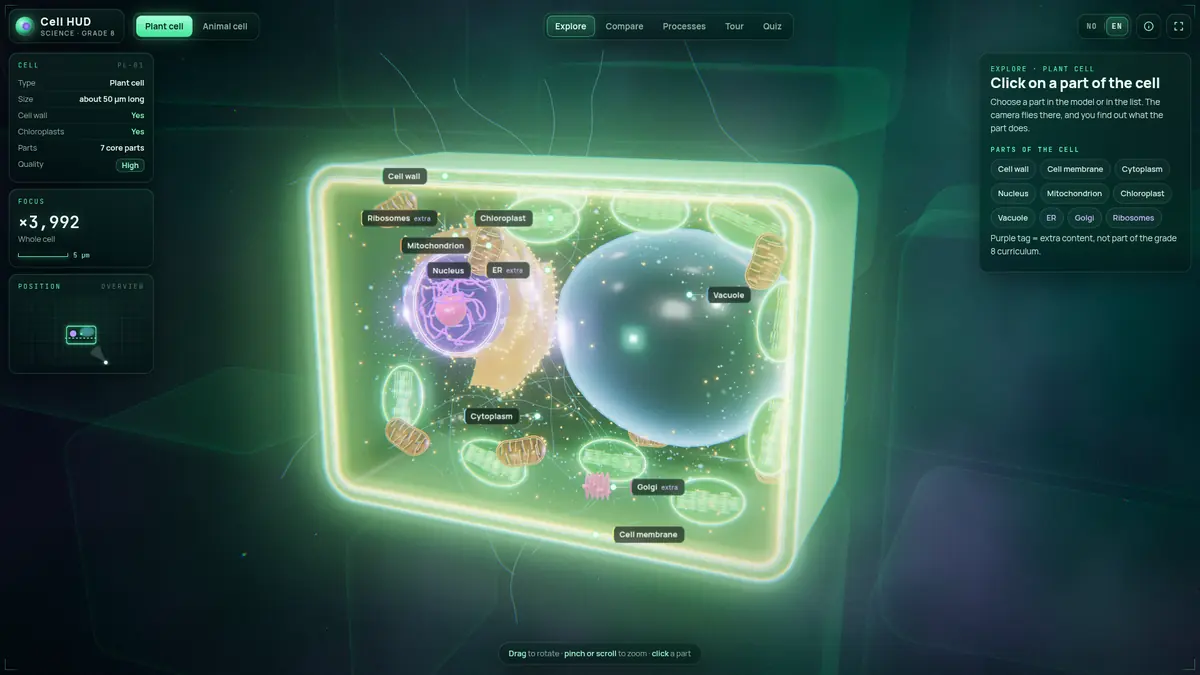
Screenshot of the Cells page: a 3D plant cell with labelled organelles Live

Science Pages (Naturfag)

Seven interactive 3D science pages for my 8th-grade class — cells, toxins, the Red List, food webs, energy, wind power and atoms. One HTML file each, offline, Norwegian or English.

  • → Plant and animal cell in 3D — click a part and the camera flies there
  • → Toxin Elevator, Food Web and Energy Chain show how toxins and energy move through a coastal food chain
  • → The Red List and Wind Power put threatened species, wind farms and reindeer herding on a 3D map of the coast
  • → Single-file HTML: runs offline in the browser, Norwegian or English
three.js GSAP Blender Playwright Grok Bot
Live Demo →

Science Pages (Naturfag)

Live

I teach naturfag (science) in 8th grade, and some topics are hard to show on a whiteboard. So I took my own teaching plans and turned them into seven pages the students can click, rotate and break. Cells, Toxin Elevator, The Red List, Food Web, Energy Chain, Wind Power and Atom Builder. Each one is a single HTML file that runs offline in the browser on the student PCs, with a NO/EN language toggle. Grok Bot, an AI assistant, wrote the code and built the pages from my plans. The 3D models are made in Blender 4.5.

Features

  • → Plant and animal cell in 3D — click a part and the camera flies there
  • → Toxin Elevator, Food Web and Energy Chain show how toxins and energy move through a coastal food chain
  • → The Red List and Wind Power put threatened species, wind farms and reindeer herding on a 3D map of the coast
  • → Single-file HTML: runs offline in the browser, Norwegian or English

What I learned

Every page started from the learning goals in my teaching plan, not from the tech. Grok Bot wrote the code and built the pages, Blender 4.5 made the 3D models and Playwright tested them, but deciding what each page should teach — and what to leave out — was still my job. I haven’t tried them in class yet.

Tech Stack

three.js GSAP Blender Playwright Grok Bot